-
Shop
- Advanced Technologies
- AI Skills Mastery 2026 Collection
- Apple Accessories
- Arts, Crafts & Hobbies
- Astrology, Tarot, Crystals & More
- Baby Showers & Gender Reveals
- Balanced Living
- Bathroom
- Beauty & Skincare
- Best-Sellers
- Birthday Celebrations
- Bridal Style & Beauty
- Calvin Klein
- Car Accessories
- Celebrations & Event Planning
- Dating & Social Confidence
- Dating & Social Skills
- Digital Resources
- Education & Learning
- Everyday Wellness
- Family & Parenting
- Fashion
- Fashion Accessories
- Find Your Path Collection
- Fitness & Movement
- Fitness Nutrition & Meal Prep
- Furniture
- Gadgets
- Gift Guides
- Halloween
- Health & Beauty
- Health & Wellness
- Healthy Lifestyle
- Holiday & Seasonal Celebrations
- Home & Garden
- Home & Kitchen
- Home Decor
- Home Electronics
- Home Supplies
- Home Workouts
- Kids & Babies
- Kitchen
- Lighting
- Men's Wellness & Lifestyle
- Nike
- Online Business
- Online Business for Beginners
- Online Content Creation & Platform Growth
- Outdoor & Active Lifestyle
- Party Planning & Entertaining
- Patio, Lawn & Garden
- Personal Growth
- Pet Care
- Pet Supplies
- Pets
- Relationships & Social Confidence
- Rest & Relaxation
- Self-Care & Personal Rituals
- Shoes
- Smart Life with IA
- Smart Shopping
- Sport & Outdoors
- Style & Fashion
- Super Deals
- Travel
- Travel & Adventure
- Wealth
- Wellness
- Popular
- Best deals
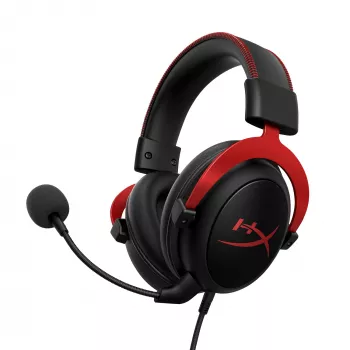
Cloud II Gaming Headset: Hi-Fi Sound and Detachable Mic

The Cloud 2 II Gaming Headset offers a straightforward combination of Hi-Fi sound, 7.1 surround sound, and a detachable microphone. It is an option to consider if you want one headset for game audio, voice chat, and other listening without keeping a microphone attached all the time.
Before choosing a headset, consider more than its feature list. Your device’s connection requirements, support for surround sound, and the way you plan to use voice chat all matter. Our team recommends thinking through those details first so you can choose equipment that suits your setup and listening preferences.
Sound for Immersive Play
Game audio does more than accompany the action. Music can set a mood, environmental sounds can make a scene feel larger, and directional audio can help give sounds a sense of position. The Cloud II is listed with 7.1 surround sound, which offers a more spatial presentation of game audio when supported by your setup.
That sense of space can make an environment more engaging, whether you are exploring a quiet setting or following a busy scene. It is not a promise that you will play better: the experience depends on the game, its audio settings, and your device’s support for surround sound.
Hi-Fi sound is also appealing if you want a headset for more than gaming. You might use it to listen to music, watch videos, or enjoy other audio between sessions. What sounds enjoyable is personal, so consider the kinds of content you listen to and the presentation you prefer when comparing options.
A Microphone That Detaches
The detachable microphone gives you a convenient way to switch between talking and listening. Attach it when you want to join voice chat, then remove it when you prefer to use the headset without a microphone in front of you. That flexibility can be useful if your gaming sessions alternate between group play and solo time.
Before buying, make sure both the headset audio and microphone are compatible with your intended device and connection. Audio output and voice-chat input may have different requirements, so it is worth confirming both rather than assuming that one working means the other will work too.
Cloud II at a Glance
The Cloud II brings together three listed features that support different parts of everyday use. The table below provides a quick way to compare what each one offers.
| Feature | What It Offers |
|---|---|
| Hi-Fi sound | Audio for games and other listening |
| 7.1 surround sound | A more spatial presentation of game audio |
| Detachable microphone | Flexibility to use the headset with or without the mic |
We list the headset at $133.01 USD, and it is in stock. Price and availability may change, so visit the product page for the current details before ordering.
Getting Ready to Play
Start by checking the connection requirements for your device and whether it supports the headset’s surround-sound feature. Consider how you usually connect audio equipment and whether your preferred arrangement leaves room for the other accessories you use. If voice chat matters to you, confirm microphone support as part of the same check.
After setup, play a familiar game or audio clip and adjust the game volume to a comfortable level. If you use the microphone, test your voice-chat input and output levels as well. A short conversation or a recording can help you find settings that work for you and the people you play with.
Keep your listening volume comfortable and take regular breaks, especially during longer sessions. The World Health Organization’s guidance on hearing loss offers broader information about hearing health and the risks associated with loud sound.
Is This Headset Right for Your Setup?
If spatial game audio and a removable microphone are high on your list, the Cloud II brings both into one headset. Think about how often you use voice chat, whether you want to remove the mic for other listening, and whether your device supports the features you intend to use. Your preferences matter too: the best setup is one that fits the way you play and listen.
If you are also organizing a larger entertainment or presentation area, our Adjustable AV Cart with Power Strip is a separate option to consider for your space. It is not required to use the headset; choose it based on the needs of your equipment and room.
Ready to compare the headset with your requirements? Visit the Cloud 2 II Gaming Headset product page for its current price and availability.
Before choosing, compare the product details with your daily routine, available space, care needs, and preferred setup. The strongest option is usually the one that fits the intended use clearly and remains simple to clean, store, and check before repeat use.
FAQ
Does the Cloud II headset have surround sound?
Yes. The headset is listed with 7.1 surround sound; check whether your intended device supports it.
Can the microphone be removed?
Yes. The headset is listed with a detachable microphone, so you can use it with or without the mic attached.
Will the headset work with my gaming device?
Check the headset’s connection requirements and your device’s support for audio, microphone input, and surround sound before buying.












Leave a comment