-
Shop
- Advanced Technologies
- AI Skills Mastery 2026 Collection
- Apple Accessories
- Arts, Crafts & Hobbies
- Astrology, Tarot, Crystals & More
- Baby Showers & Gender Reveals
- Balanced Living
- Bathroom
- Beauty & Skincare
- Best-Sellers
- Birthday Celebrations
- Bridal Style & Beauty
- Calvin Klein
- Car Accessories
- Celebrations & Event Planning
- Dating & Social Confidence
- Dating & Social Skills
- Digital Resources
- Education & Learning
- Everyday Wellness
- Family & Parenting
- Fashion
- Fashion Accessories
- Find Your Path Collection
- Fitness & Movement
- Fitness Nutrition & Meal Prep
- Furniture
- Gadgets
- Gift Guides
- Halloween
- Health & Beauty
- Health & Wellness
- Healthy Lifestyle
- Holiday & Seasonal Celebrations
- Home & Garden
- Home & Kitchen
- Home Decor
- Home Electronics
- Home Supplies
- Home Workouts
- Kids & Babies
- Kitchen
- Lighting
- Men's Wellness & Lifestyle
- Nike
- Online Business
- Online Business for Beginners
- Online Content Creation & Platform Growth
- Outdoor & Active Lifestyle
- Party Planning & Entertaining
- Patio, Lawn & Garden
- Personal Growth
- Pet Care
- Pet Supplies
- Pets
- Relationships & Social Confidence
- Rest & Relaxation
- Self-Care & Personal Rituals
- Shoes
- Smart Life with IA
- Smart Shopping
- Sport & Outdoors
- Style & Fashion
- Super Deals
- Travel
- Travel & Adventure
- Wealth
- Wellness
- Popular
- Best deals
65W GaN USB-C Charger: Compatibility and Quick Charge
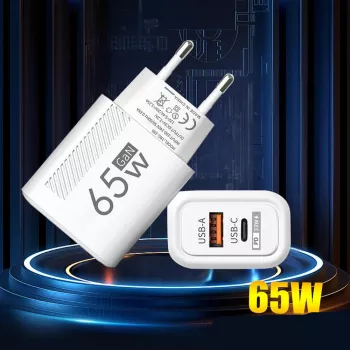
A dependable charging setup starts with a charger that suits your devices. Our 65W GaN USB C Fast Wall Charger with Quick Charge offers a straightforward option for powering compatible devices at home or on the go. Its stated 65W rating, gallium nitride technology, and USB-C connection make it worth considering when you want to simplify your setup.
Before you plug in, take a moment to match the charger with your device and cable. A 65W rating does not mean every device will charge at the same speed, and a USB-C connector alone does not tell you which fast-charging standards are supported.
What the 65W rating means
The 65W figure is the charger’s stated power rating. It describes the power the charger is designed to provide, not a fixed amount that it forces into every connected device. A phone, for example, may draw less power than a laptop, even when both use USB-C charging.
Actual charging power depends on several factors: what the device requests, what the charger supports, and whether the cable can carry the required power. Charging standards also matter because the device and charger need compatible ways to negotiate their supported charging modes.
Start by looking at the power requirements in your device manufacturer’s guidance. If your device needs more than 65W for its intended charging mode, this charger may not be the right fit. If it requires less, the rating alone does not guarantee compatibility; the supported charging protocol and cable still matter.
Why choose a GaN USB-C charger?
Gallium nitride, often shortened to GaN, is a semiconductor material used in charger electronics. It can support efficient, compact charger designs, making GaN chargers an appealing choice when you want less clutter around an outlet or in a travel bag.
USB-C is also a widely used connector across phones, tablets, laptops, and accessories. That can make it easier to organize your cables, but the connector’s shape is only one part of the decision. Two USB-C devices may have different power requirements or rely on different charging protocols.
For background on one widely used charging standard, the USB Implementers Forum’s USB Power Delivery guide explains how USB power delivery works. Check the specifications for your own device and charger rather than assuming that every USB-C connection supports the same features.
Check compatibility before plugging in
Many phones and tablets charge over USB-C, as do some laptops. Their requirements vary, though, so our team recommends checking three things together: the device’s power requirement, the supported charging protocol, and the cable’s power rating.
The product title mentions Quick Charge. Before relying on that feature, verify the exact protocols and versions supported by both your device and the charger. A compatible connector does not establish whether a particular Quick Charge mode is available.
Charging compatibility checklist
| What to check | Why it matters |
|---|---|
| Device power requirement | Helps determine whether the 65W rating is suitable. |
| Charging protocol | The device and charger need compatible standards for their supported charging modes. |
| USB-C cable rating | The cable must support the power required by the device. |
Keep the device manufacturer’s charging guidance handy when comparing these details. For a laptop, look beyond the plug and confirm the required wattage and charging standard. For a smaller device, use a suitable cable and remember that its charging power may remain well below the charger’s stated rating.
Make it part of your daily setup
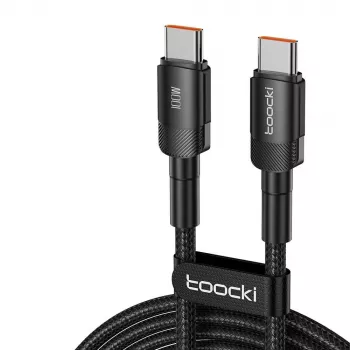
Pair the charger with a suitable USB-C cable and keep it where you most often need power: near your desk, beside a bedside outlet, or in your travel bag. If you move between locations, storing the cable with the charger can save you from hunting for a compatible one later.
Before use, inspect the cable for damaged insulation, bent connectors, or other visible wear. Keep the charger dry, and leave room for ventilation while it is operating. If a cable or charger appears damaged, stop using it. The Electrical Safety Foundation International provides additional electrical safety resources for your home.
If you are organizing a shared workspace or presentation area, our Adjustable AV Cart with Power Strip is another option to consider for equipment storage and access to power. Check its specifications separately to see whether it suits your setup.
Ready to decide? Visit the charger’s product page for its current price and availability, and confirm the charging details you need before ordering.
Before choosing, compare the product details with your daily routine, available space, care needs, and preferred setup. The strongest option is usually the one that fits the intended use clearly and remains simple to clean, store, and check before repeat use.
FAQ
Will this 65W charger charge every USB-C device at 65W?
No. Charging power depends on the device, cable, and compatible charging standards; many devices draw less than 65W.
Can I use this charger with a USB-C laptop?
You may be able to, but first check the laptop’s power requirements and charging standard against the charger’s supported protocols. Use a cable rated for the power required.
Does USB-C automatically mean Quick Charge is supported?
No. USB-C describes the connector; charging protocols and their versions must be checked separately.



Leave a comment